Steamhammer’s timers
UAlbertaBot comes with a system of timers: It divides the bot’s work into aspects, and for each frame times how much time was spent on each aspect. Steamhammer inherited it. Overkill also inherited it, and if you’ve seen Overkill play on the SSCAIT stream then you’ve seen its timer display in a big black box smack in the middle of the screen. On a standard Broodwar screen, much smaller, the box is in the lower right.
The display only shows the times for one frame. I found it less useful than it could be; you have to be watching closely to see any spikes in specific aspects. So yesterday I extended it to remember the high water mark for each aspect, the longest time it has taken during the game. If there are time usage spikes, I can quickly get an initial idea of where they are.
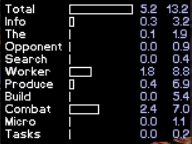
At the time of the picture, Steamhammer’s supply was 187. Some of the aspects of play named down the left are the same as UAlbertaBot’s; others are new or changed. The bars represent time in milliseconds for the previous frame, the same as the first column of numbers. The second column of numbers is the peak time in milliseconds. (I decided that drawing the peaks on the bar graph would compress the real-time display too much.) Worker management, production, building construction, and combat are the most expensive aspects. Search means BOSS search, which does not happen for zerg, so the 0.4ms peak probably means that the OS dropped in that much delay at some point. The Tasks are a couple of jobs that the bot already did that I converted into tasks, nothing new yet.
If I run into slowdowns in the future, maybe I’ll extend it more and keep a histogram for each aspect to see how often it is slow.
The code that does the timing is straightforward and exactly like UAlbertaBot. Here’s the code to time the Info line of the display.
    _timerManager.startTimer(TimerManager::InformationManager);
    Bases::Instance().update();
    InformationManager::Instance().update();
    _timerManager.stopTimer(TimerManager::InformationManager);
Comments